Lagoa Rebirth
Back in 2002 I was doing some programming gigs when I started in 3D by making interactive demos of industrial motors using HTML, Flash and 3D.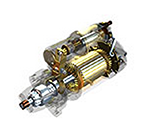 The job paid badly but it was really fun.
I learned a ton about the creative process and the demos meant a lot to the client as they could visualize what they were going to make before they decided to make it. It was empowering for everyone.
After that job I drifted into TV, then advertising, motion graphics, movies and games. I think I have seen it all in terms of workflows and the creative process. Then I found myself limited by the tools I was using, so I moved from design to technology development to build new ways for people to create. That is how Lagoa MultiPhysics was born:
Since Lagoa MultiPhysics I’ve learned a few things about the software industry. The good the bad and the ugly. I was fortunate to work with some amazing people and get in contact with some great companies, but after a few years reality hit me in the face: The software industry has changed and the 3d world was left behind!
Before I crossed over to software development, I was only a user. Here is how I qualify us users:
- We are demanding of our tools and ourselves.
- We are loud when things work the way we expect them to work.
- We get angry when things don’t work the way they need to.
- We like to create stuff, we do not like to pay for software.
Put it simply – I know how I feel as a user, and as a developer I know how freaking hard it is to satisfy all of the above.
The developer in me not only needed to work on hard problems, but needed to be able to work faster, fix bugs faster, fix user problems faster, get you new features faster… In other words, I need a platform to grow technology that can be used by users. Not be stuck on a chain of desktop software rules.
So I cut a lot of hard-wires and re-thought digital creation from the ground up. I hired a bunch of really smart people and built something new that is thought for our generation.
This is how TeamUP (now Lagoa.com) was re-born.
Can’t wait to see what you can do with it!
-Thiago
Lagoa Training & Artists
I often get requests of Lagoa artists available. I know a handful of them and I always pass it around to the people I know. But from time to time someone new appears doing beautiful simulations. See Artemy Craft on Vimeo.
I’m putting together a list of Lagoa users that should go on the website, so if you are a “pro” and want your name to be there just drop me a line.
If you are not a pro – drop me a line too, but it might be good time to become one since there’s now plenty of Lagoa Training out there, and also demand. So to help you get started with the tool I’m listing two places you can start with:
Digital-Tutors has a nice collection of videos that should cover the basics. You can jump right in.
i3D Tutorials has recently published a two volume Lagoa Training series with over 25 charpters that covers a whole lot:
Have a good learning of Lagoa Multiphysics!
Web Presence
Many people have been asking what am I working on and what’s the silence all about. All I can say now is that I’m working on some really exciting things, with some really exciting people  And yes it has to do with Graphics and yes it’s for Lagoa. Look forward to some action in the coming months!…
I’m planning to do some changes over here so if you are a follower of this blog and my work, I hope you will appreciate the changes.
I will starting morphing this site into an articles page, I don’t know what to do with the old content yet, but this is indeed a public history of my professional career, so it’s very likely that I will just keep it all up.
There are other ways to keep in touch with me. You can:
- Start following me on Twitter at @thiago_at_lagoa.
- Facebook is something I use to keep track of my friends, so just add me on FB if we have met before (definitely not sharing Halloween party pictures with people I don’t know…).
- I did not figure out what’s Google plus for, but apparently I’m this number here: https://plus.google.com/114591691200581760259/
- If your thing is business with Lagoa, you can always email me at [email protected], or find me on Linkedin http://www.linkedin.com/in/thiagocosta3d
Finally, please signup to our mailing list at www.lagoatechnologies.com, so you will be the first to receive news directly from us.
Tendril for OpenText
Tendril Design+Animation Toronto based studio completed a beautiful piece for Open Text with lot’s and lots of papers simulated in Lagoa Multiphysics for Softimage
“On a technical level, much of the content animation was handled using Lagoa Technologies’powerful multiphysics simulation engine. Over the course of the project we simulated more than half a million ‘pages’ and generated over 45GB of simulation data. Lagoa was also extended in order to create the flocking behavior seen in some shots.”
I’ve participated in this project helping sorting out any kinks related to the paper simulation, as well as developing specific algorithms for stacking up papers and controlling the animations.
3D World Magazine CG Awards 2011
A couple more indications to Lagoa Multiphysics:
- Plugin of the Year
- Software innovation of the year
http://cgawards.3dworldmag.com/
Vote now!
Lagoa Survey
This rolled out today: Lagoa Survey 2011
Takes like 5 minutes to answer and you might win a Mudbox+Maya license! But for real we need to get your input! go go go!
Lagoa Newsletter
We want to centralize news regarding updates, next beta cycles, training etc for Lagoa… So we put up a newsletter that you can sign-up at www.lagoatechnologies.com
Generally the design and development of Lagoa is highly driven by users, so don’t be shy if you get a couple questions from us at some point
Lagoa for Softimage – user videos on Vimeo
Check out what users are creating with Lagoa Multiphysics for Softimage on Vimeo!
Thanks Vladimir Jankijevic, Michael White, Yoshiyuki Watanabe, Guillaume Laforge, Stephan Woermann, Sam Howell, Andreas Böinghoff, Reinhard Claus, Farid, Byungchul Kang, Tim Marinov and everyone else.

Autodesk Master
I was nominated “Autodesk Master”,
I’ve own Autodesk Master 2010, category Softimage! You can see all nominees on http://area.autodesk.com/masters
Thank you,
Focus on Lagoa
Today I have resigned from Ubisoft and decided to focus all my time on Lagoa.
Was great the time I spent at Ubisoft Digital Arts working on asset management tools and giving Technical Direction to Softimage users, but now I rather work on Lagoa and research computational physics and software development.
If you have interest to use our technology or services please contact us at:
[email protected]
Lagoa Technologies
Lagoa Multiphysics 1.0 teaser!
After quite sometime Researching and Developing particle physics algorithms I’ve finally completed v1 of this tool.
There’s a lot of buzz out there about this tool. It came as a surprise that more than 1.5 million 2 Million people actually wanted to watch this video!
FAQ:
Why?: Out of passion, first. Second out of frustration with existing tools. Perfect combination!
Who’s this for?: First it will be deployed as a plugin for Autodesk Softimage
How much will it cost?: Not sure yet.
Can I try it?: Sure, just apply on www.lagoatechnologies.com website
More information will be posted on the website.
thanks,
-Thiago
Ben Steiger Levine – Sprite Ad (MassMarket)
via Motionographer
Director Ben Steiger Levine (effects done at MassMarket) featuring Drake exploding in Sprite soda.
The Effects were made using my earlier fluid simulator (Smoothed Particle Hydrodynamics tool for ICE).
Looks cool, check it out!
Exocortex SlipstreamFX – Smoke Simulator
Ben Houston’s Exocortex approached me to help on the development of a realtime smoke simulator for Softimage ICE. This is the outcome which I just got permission to show.
SlipstreamRT for Softimage is a proprietary real-time smoke simulator developed for Softimage’s ICE system in collaboration with [exocortex.com/ Exocortex Technologies, Inc.] This video is posted with permission from Exocortex Technologies, Inc. For licensing information please contact [email:[email protected]]
I’ve worked on most of the components of the solver including boundary conditions (laminar flow, turbulent flow), vortex shedding, the vorticity equation and particle splitting algorithms.
Most of the tests on this video are done by myself, I’ve also implemented all the workflow and controls demoed in the video.
-Thiago
My work on Assassins Creed Lineage
Just finish working on these series of short films for Assassins Creed 2. The game looks amazing as well!
This project was a joint effort between Hybride (Film studio Acquired by Ubisoft) and Ubisoft Digital Arts (Ubisoft’s own Film studio).
I’ve developed the workflows/tools and lead the Technical Directors ( as well as pipeline development) during the project at Ubisoft.
This was quite an experience and I’m happy with the results, although I wish we had more than 5 months to produce the whole thing…
In my opinion (and not because I worked on it) this is the first adaptation of a “game to film” that makes into the form a short film, and doesn’t let me (completely) down. It actually leaves that feeling that we could explore more of this universe in a full length feature film.

I would be looking forward to work on a full feature film for this brand, with a lot of time to produce it of course
More http://www.youtube.com/user/assassinscreed
or http://www.assassinscreed.com/
Mesher for the SPH
There are at least 3 different meshers for ICE particles that can be used with the SPH:
And Guillaume Laforge is doing this pretty cool project that constructs a fast scalar field in ICE and passes to the polygonizer in a grid structure.
The coolest stuff for me is that the distance function on Guillaume’s polygonizer is an ICE compound! So you can play with it right there and manage to change the way the polygonizer will weight the surface.
It’s exciting to see all these people developing these tools and they are all compatible with my SPH solver, have fun!
Mesher by Eric Mootz

G.I. Joe: The Rise of Cobra
I had a blast working with the crew of CafeFX on G.I. Joe: The Rise of Cobra.
I think the release date for the film is fixed to August, I will see you in the movie theaters!
My work was mainly as FX Lead/TD working on shots and also providing some tools for the other artists.
I have to say thanks to: David Ebner, Jeff Barnes, Seth Lippman and all the crew at CafeFX!
See the whole crew here: http://www.imdb.com/title/tt1046173/fullcredits#cast

cmiVFX introduction to ICE
I’ve finally finished producing 4 hours of training material on Softimage|ICE platform. I explain the math, core workflow and several computer graphics techniques behind creating some amazing tools that can be used in production.
This series is packed with examples and is more of a intermediate/advanced focused. Although if you are a beginner you might find this really exciting get you to dive into ICE right away!
To buy it, visit cmiVFX website

Have fun!
SPH Fluids, looking for testers!
Hello, we are looking for testers to join the SPH fluids simulator for ICE.
This is a free set of nodes for ICE, all you need is register to get access to the testing group, Addon, sample scenes and documentation.
| Google Groups |
| Subscribe to ICE SPH Fluids |
| Email:
|
| Visit this group |
SPH Fluids in ICE
I’ve been working on this SPH (Smoothed Particles Hydrodynamics) fluids simulator for XSI’s ICE.
I did my own collisions logic, integration, substeps, all the physics part, etc… using low level ICE nodes, and now some compiled C++ nodes.
The simulator supports pressure, density, viscosity, tension, collisions and some other stuff.
visit my page on Vimeo for some previews:
Graphing in ICE
Visualize the graph of a function is not easy (at least for me), without plotting the function.
It can be really hard to understand what y = x^2 * z^2 looks like.
So I obviously did an ICE compound with these most common graphs.
I couldn’t stop doing functions and playing with it, so I ended up with this list, all in the same compound:
x*z
x^2 + z^2
x^2 – z^2
x^2 * z^2
x^3 + z^3
sin(x)
cos(x) + cos(z) ^ 2
cos(x^2 + z^2)
sin(x^2 + z^2)
-1 / (x^2 + z^2)
|cos(x) + cos(z)| ^ (1/2)
cos(x) + cos(z)
| cos(x^2+z^2) | ^ (1/2)
|cos(x+z)| ^ (10/2)
cos( |x| + |z| ) * ( x + z )
cos( |x| + |z|) * (|x| + |z| )
cos( |x| + |z| )
|sin(x) * ( sin(x) + cos(z) )| ^ 0.2
sin(x^2) * cos(z^2)
Some are very common, others are not. It’s cool how many crazy patters you can get using these functions.
Hopefully this will work as a “educational” resource, so you can see what these functions look when applied to a 3d shape and understand how Sin, Cos, Absolute values, etc, can affect the function.
Here is what these equations look like when applied to a grid:
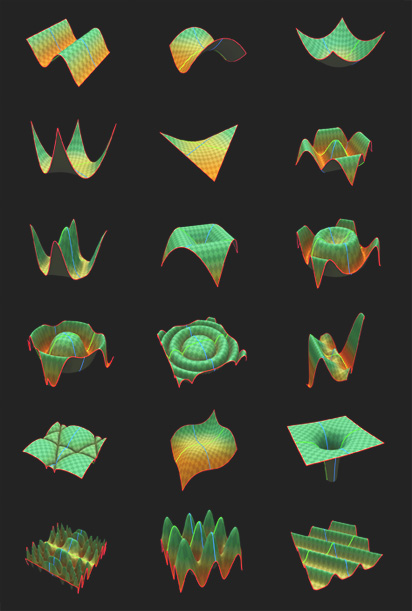
What’s even more cool in ICE is that after I had all the functions done, I could apply this as a force, a weightmap… basically anything that reads a 3d vector or a scalar.

Microsoft Zune
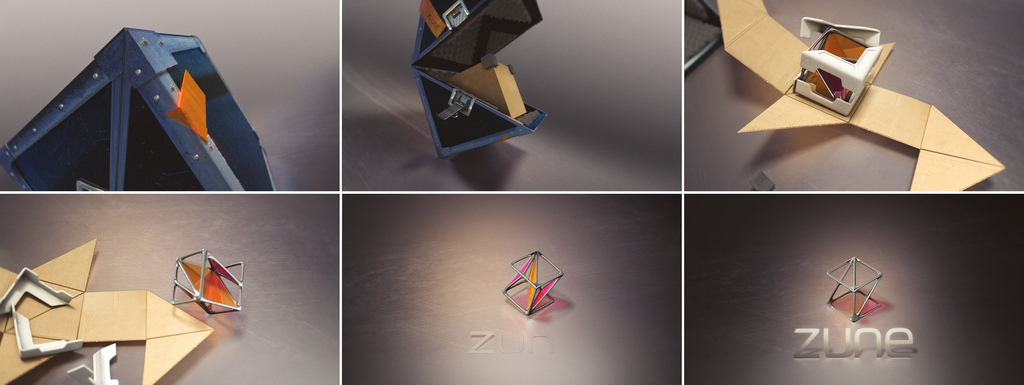
Package of 6 animations done at Nervo.tv for Zune.
My participation on this project started on RnD, and how we would make the simulation work on the cube shape, then how to animate it. I also did most of the lighting work and the final compositing/color grading.
Few interesting things from this project:
The “Boxes” animation was done simulating rigid bodies in XSI, and a lot of layered animation on top.
The “Liquids” one I had to write a little script to allow me import a sequence of meshes, that came from a standard particle simulation. To then enable people to tweak it later, in a mesh state and apply relax operations etc.
The “Sweets” one was very tricky too, each frame of the animation is a different object. Like a 3d stop motion technique.
This project was fun and challenging at the same time, I’m pretty happy how it turned out.
To see some original sketches/concepts just follow Fabiana’s website
.
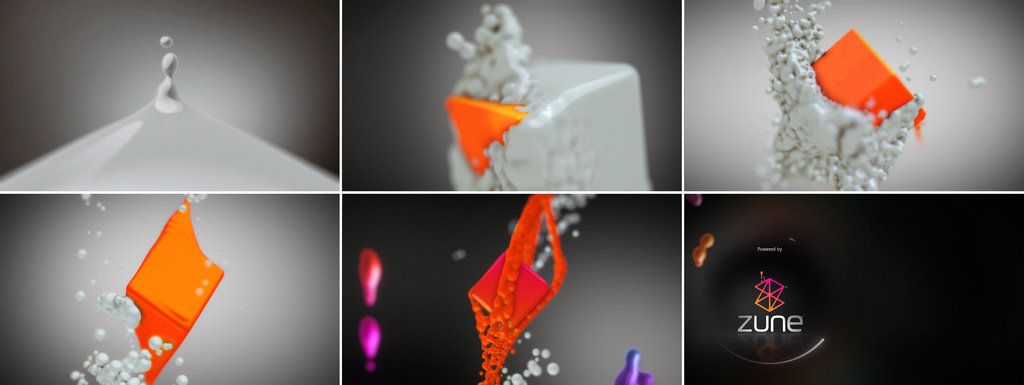
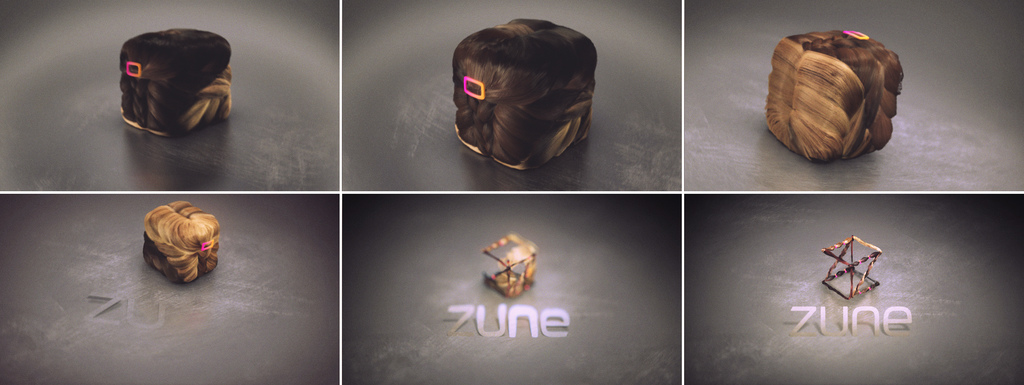
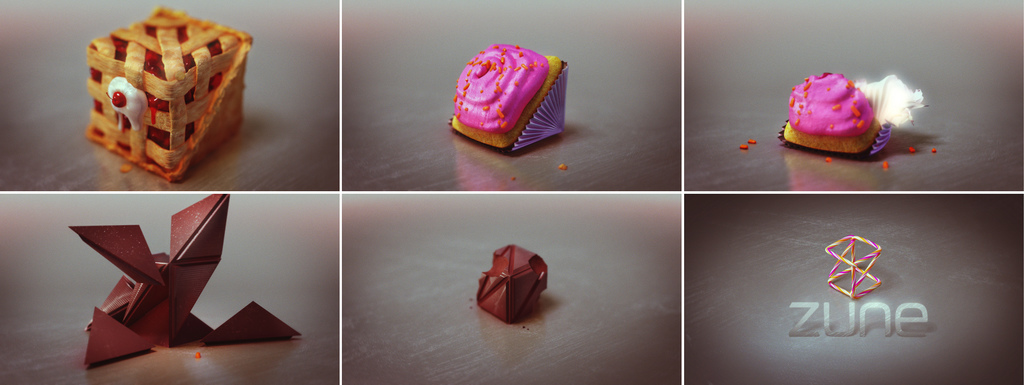
Credits – project page http://nervo.tv/index.html?sect=5&proj=zune
Creative Director: Nando Costa
3D Artists: Thiago Costa, Jeff Norombaba, Joshua Cox, Catherine Langevin, Gabriel Beauvais
Compositing: Thiago Costa, Jeff Norombaba, Alphonse Swineheart, Robbie Johnstone
Storyboard Artist: Fabiana Fortes
Music: Darrin Wiener
OBJ Sequencer
I’ve uploaded my Obj Sequencer in the community site.
This tool was used during the Zune project to import sequences of animated liquids. This saved us a lot of time during the production.
ICE – Particle density
Based on the number of neighboring particles, this compound can adjust the color around the boundaries of a particle cloud.
The range is calculated based on the number of points in the island, so a gradient is smoothly blended to the particle color.
This can be used in any region of the stack. Plug the Execute Color in one ICEtree port and you are good to go.
However if you want the color to update with the simulation, you must use this in the simulation region.
Digital Kitchen “The Company” nominated to Emmy Awards!
The Company was nominated in the category Main Title Design for the 60th Primetime Emmy Awards!
I was lucky enough to be on this project with Digital Kitchen – Seattle.
The Company • TNT
Studio: Digital Kitchen
Creative Director: Matt Mulder
Lead Designers: Cody Cobb, Ryan Gagnier, Noah Conopask
Animatiors: Ryan Gagnier, David Holm, Pete Kallstrom, Matt LaVoy, Dayvd Chan
3D: Cody Cobb, Igor Choromanski, Gordana Fersini, Thiago Costa
Editor: Dave Molloy
Producer: Jill Johns, Colin Davis
Executive Producer: Mark Bashore
My participation here was on the last scene, from the transition to the mushroom to the end. The guys at DK and Cody Cobb specially worked really hard to give all the styling on the final frame, with lot’s of render passes and even drawing things by hand over the 3d render.
Shaderballs for Softimage|XSI
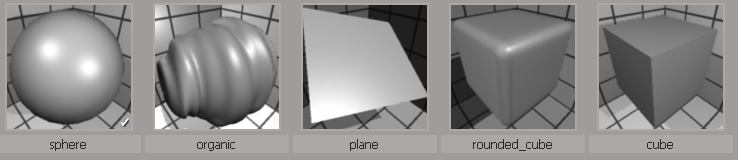
Here are a bunch of Shaderballs for XSI
Visit the page in the Softimage Community
Runner for Timex
For this Timex spot done at Nervo.tv, I worked mostly in the runner, but also in some background elements.
The runner rig/animation/cloth simulation was pretty fun, I worked with Syflex, used Refmodels to manage the versions of the runner and also developed the look of this guy in 3d.
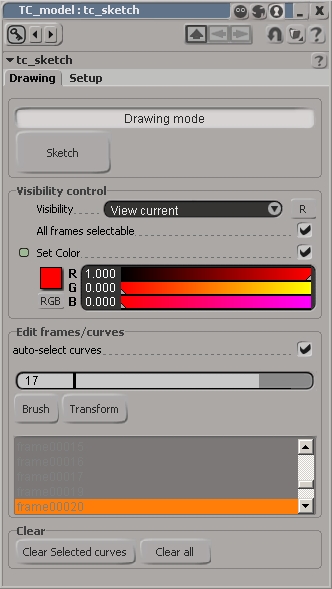
TC Sketch v1.1 – Grease pencil for XSI.
Like the grease pencil tool for Maya, this tool allows you to draw with the sketch tool for 2d animation/per frame annotation, directly in the XSI viewport.
Changes V1.1
- Assembled the XSI Bezier curve tool, CV Curve tool and Curve Text tool to be used from the TC_sketch PPG
- Added the “edit frames” command, now you can move your frames in time, selecting a frame in the listbox and using the “up” and “down” buttons.
- Added the code to work on linux system.
- The current frame stays visible until the next frame.
- The listbox now let you navigate/select frames to edit.
- “Default frame duration” option in the setup tab was renamed to “Last frame duration”. So now it just affects the last frame of the animation.
- Re worked the entire keyframing command
Features V1.0
- Drawing mode Auto-keyframing (selectability/visibility).
- Curves color and Visibility/Selectability overrides.
- Curve editing The “nav slider” in the “Edit Frames” group is useful to edit/add curves to existing frames. Change this slider will jump the XSI timeline to where the sketched curve is in time.
- Auto-select curves option will automatically select all the curves for that given frame.
- XSI Brush tool and View Proportional Transform Tool can be called from the TC_sketch PPG.
- The Sketch tool creates a standard XSI curve, so you can use any XSI deformer tools on it.
Download addon from the Softimage Community
Here is a video showing this tool